My friends recently gave their 10th and 12th exams, and 6-7 days before the exams I got AI to make question papers for them and explained the topics of theory subjects like social science in short. I have run these prompts more than 50 times, and most of the time the answers were useful. This post gives a simple way to write prompts, and at the end you will find 20 prompt examples that you can change according to your own work and use.
What is a prompt, and why does a short prompt give an average answer
A prompt is the text instruction that you give to a tool like ChatGPT, Claude or Gemini. AI cannot read what is in your mind. It understands only what you write, so for a two-word prompt like 'write a story', it guesses who the story is for, how long it should be and on what topic.
See the difference between the two prompts:
Bad prompt: Write me a story.
Better prompt: Write a short story of 150 words for Class 5 children in which a little elephant learns honesty. The language should be simple Hindi and there should be a moral at the end.
In the second prompt, the reader (Class 5), the length (150 words), the topic (little elephant and honesty), the language and the ending are all decided. So AI does not have to guess, and the answer is directly useful.
What you need before you start
An account on an AI tool, a phone or laptop with internet, and 10 minutes of time. Many tools like ChatGPT give a free plan, but the limits and features keep changing, so check the plan details on the tool's official page. Also open a notes app or a document, because you have to save the prompts that work well right there.
The formula for a good prompt: Role, Task, Context, Format, Tone
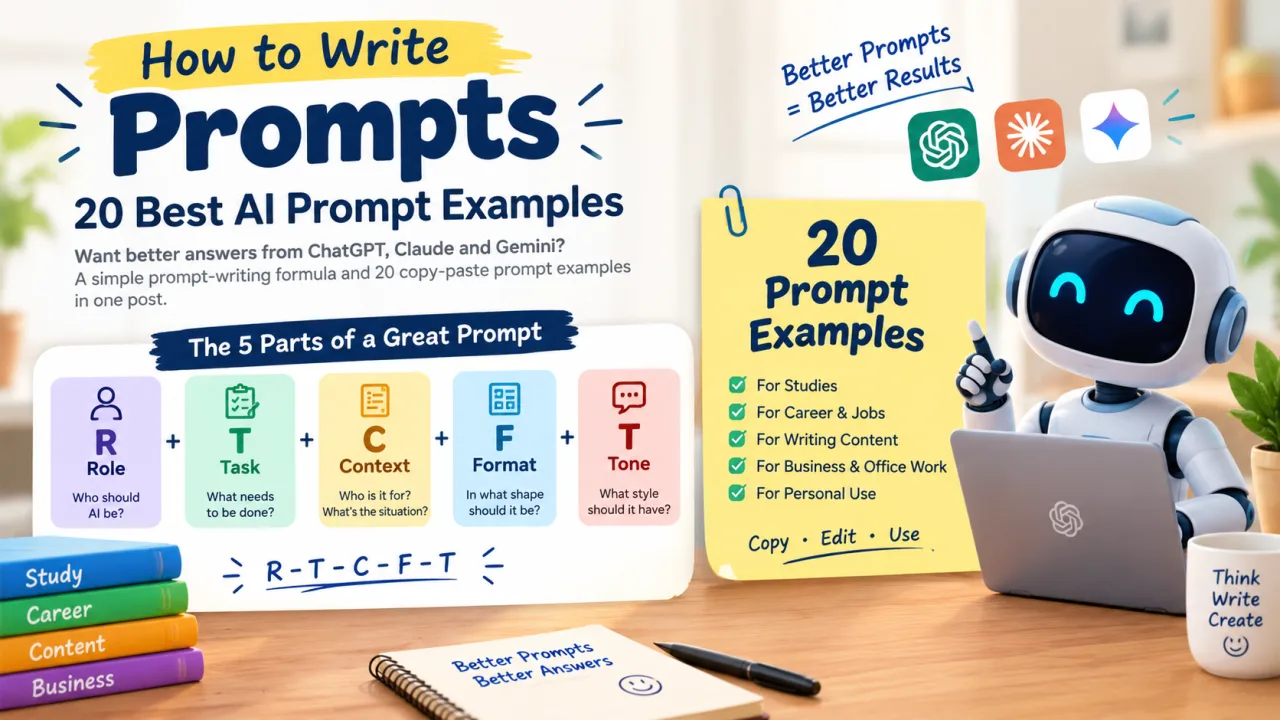
Every good prompt is made of these five parts. Just remember them as R-T-C-F-T.
Role means telling the AI who it should be, like "You are a teacher". In Task, write clearly what has to be done, like "explain photosynthesis". In Context, tell your situation, like "I am a Class 8 student", so that the AI knows who the answer is for. In Format, decide the shape of the answer, like "in 5 simple points". Finally comes Tone, that is, the style of the answer, like "friendly" or "formal".
All five parts are not necessary in every prompt. For a small task, Task and Format are enough. Anthropic's guide says that you should show your prompt to a person who does not know the context of the work, and if that person gets confused, the AI will also get confused. So after writing, ask yourself: can a completely new person read this and do the work?
Here is how all five parts look together:
You are a teacher. Explain photosynthesis to Class 8 children. The children are weak in science. Write in 5 simple points and keep the style friendly.
20 prompt examples, in 5 categories
Change the subject, city or name written in every prompt to suit your work. Where it says 'I am pasting', put your own text below the prompt.
For studies
Prompt 1 (understanding a difficult topic): "You are a teacher. Explain photosynthesis to me in simple Hindi, as if I am a Class 8 student. Give one everyday example and ask 3 quiz questions at the end."
Prompt 2 (making notes): "Summarise the paragraph given below in 8 short points. Write the meaning of difficult words in brackets. I am pasting the paragraph below."
Prompt 3 (exam plan): "I have 7 days left for my Maths exam. The chapters are algebra, trigonometry and statistics. Make a 7-day plan based on studying 3 hours a day and keep 15 minutes of revision at the end of every day."
Prompt 4 (testing yourself): "Make 10 MCQs on the fundamental rights in the Indian Constitution. Keep the difficulty medium and give the answers separately at the very end."
For career and jobs
Prompt 5 (resume): "You are an HR expert. Write a one-page resume for a fresher Python developer. Skills: Python, SQL, Git. Mention two internships. Keep the format ATS-friendly and give it in plain text."
Prompt 6 (cover letter): "Write a cover letter of 200 words for the job of digital marketing executive. My strengths are basic knowledge of SEO and good writing. Keep the tone confident but polite."
Prompt 7 (interview practice): "You are an interviewer. Ask me 5 questions for customer support executive one by one. After my answers, give feedback and show an example of a better answer."
Prompt 8 (career roadmap): "I am a commerce graduate and I know Excel. Tell me 3 career options and give a learning plan for the first 3 months of each option."
For writing content
Prompt 9 (blog ideas): "You are an SEO expert. For a fitness blog, give 15 topics that beginners search on Google. Give one title along with each topic."
Prompt 10 (blog outline): "Make an outline of a blog on the topic how to start a tea shop at home: intro, 6 headings, FAQ and a final section. The reader is a beginner."
Prompt 11 (YouTube script): "Write the script of a 5-minute YouTube video on the topic 'why the phone battery drains fast'. There should be a hook in the first 10 seconds, 3 main points in the middle, and a request to subscribe at the end. Write in Hinglish."
Prompt 12 (social media caption): "Write 5 different captions on Instagram for handmade candles. Each caption should be 2 lines and the style should be friendly."
For business and office work
Prompt 13 (professional email): "Write a professional email to the client that the website work will be delayed till 15 November. Say sorry, give the new timeline and keep the email under 100 words."
Prompt 14 (small business ideas): "I have 50,000 rupees and I live in a small town. Tell me 5 small business ideas and write 3 steps to start each idea."
Prompt 15 (meeting notes): "From the meeting notes given below, make a table of action items, deadlines and the responsible person. I am pasting the notes below."
Prompt 16 (product description): "Write a 100-word description of a stainless steel water bottle for an online store. Tell 3 main benefits and keep the style trustworthy."
For daily life and learning a new skill
Prompt 17 (skill roadmap): "I want to learn video editing and I am a complete beginner. Make a 30-day roadmap with only 1 hour of work every day."
Prompt 18 (English speaking practice): "You are my English speaking partner. Talk to me in English on topics from daily life. Correct my mistakes and explain them in Hindi."
Prompt 19 (making a decision): "I am confused between a laptop and a tablet, for studies and typing. Tell me the pros and cons of both in a table and also tell me what things I should pay attention to."
Prompt 20 (trip plan): "Make a 3-day trip plan for Jaipur, the budget is 15,000 rupees. Give the schedule for each day and suggestions for food."
Decision prompts like Prompt 14 and 19 are only for ideas. Before taking a real decision about money or buying, check the price and details yourself.
How I used prompts for studies
6-7 days before the exam, my friends needed two things the most: question papers for practice, and a short explanation of theory topics. For the question paper, I gave the AI the topic directly and said take out a question paper from this topic. This method worked in both science and social science.
In theory subjects like social science, remembering long chapters is the hardest. There I wrote in the prompt along with the topic that explain it in short. In my opinion, two things should always be written in a prompt: which class it is for and how short the answer should be. This way the AI does not have to guess what level of answer to give.
I ran both these types of prompts more than 50 times and most of the time the answers were useful. One more method of mine was to make the prompt a little clearer and run it again, like adding the marks or the number of questions to the question paper. One advice is that before giving an AI-made question paper to anyone, match it once with your class book, because sometimes AI puts in a question from outside the topic.
What to do if you do not like the first answer
According to OpenAI's help guide, a prompt does not become perfect in one go. See the first answer, then change the wording, add context or make the request shorter. For tone also, the same guide asks to write words like formal, friendly or humorous.
If you are not happy with the answer, you can write like this in the follow-up:
This answer is very long. Make it in 5 points, remove the technical words and add one example.
If you want a particular style, paste two-three lines written by you and say 'write in this style'. On Anthropic's multishot prompting page, this way of guiding AI by giving examples is explained.
Common mistakes and their solutions
New people make mostly these mistakes, and the fix for each is small.
- Giving a very short prompt. Instead of 'Write a resume', write your job role, skills and experience.
- Putting many tasks in one prompt. Make three separate prompts for resume, cover letter and interview practice.
- Not telling the format. Write 'in a table', 'in 5 points' or 'in 100 words'.
- Stopping at the first answer. Use a follow-up prompt to get the answer shorter, simpler or more detailed.
- Using facts without checking. Confirm things like date, number, law or medicine from an official source.
Which AI tool to use
ChatGPT, Claude and Gemini are the commonly used chatbots. Run the same prompt in two-three tools and see, because the style of the answer is different and you can keep whichever you like. If the daily limit of one tool is over, paste the same prompt in another tool. The difference between the free and paid plan and the price keep changing, so see that on the tool's official page.
Limitations, privacy and risk
AI can sometimes give wrong or old information, especially in names, dates, numbers, and legal and money matters. Do not use such an answer further without checking it.
Never put private things like password, OTP, bank details or Aadhaar number in a prompt, and not anyone else's personal data also. Before using AI for assignments or office work, check whether the school or company allows it or not.
Do not publish AI-written text directly. Edit it in your own words and add your own information, so that the post feels like yours and does not match what someone else has written.
My real experience
Every day I learn some new AI tool and see how it works for studies. 6-7 days before my friends' 10th and 12th exams, I got question papers made on science and social science topics and explained the theory topics in short. These prompts ran more than 50 times and most of the time the answers were useful.
About tools, I can say this much that many tools like ChatGPT can be used free right now, so you do not need money to start. Check the limits on the tool's official page.
During this time I do not remember any mistake in which the answer went completely wrong, so I am not writing any story of a mistake here. Still, in my opinion, every question paper should be matched once with the book.
Who this is for and who it is not for
This is useful for students, because prompts 1 to 4 are directly on studies and things like an exam plan get made quickly. Job seekers can start with prompts 5 to 8, where there are resume, cover letter and interview practice. For bloggers or YouTubers, the content prompts 9 to 12 are useful.
This post is not for people who expect guaranteed earnings or results without effort from one prompt, because checking and editing the AI's answer remains your work. For developers looking for API or advanced prompting, this guide is very basic.
Sources
- https://help.openai.com/en/articles/10032626-prompt-engineering-best-practices-for-chatgpt
- https://platform.claude.com/docs/en/build-with-claude/prompt-engineering/be-clear-and-direct
- https://platform.claude.com/docs/en/build-with-claude/prompt-engineering/multishot-prompting
Disclaimer
This post is only for information. The AI's answer can have mistakes, so for health, money or legal matters, confirm with an expert or an official source.
How to Read Your Palm Using AI: Free Step-by-Step Guide (2026)
Prompting vs Looping: Which AI Agent Approach Should You Use in 2026?