
I gave ChatGPT Dots one job for 2 days: every 6 hours, keep an eye on the latest AI news and newly launched AI tools. In these 2 days I got 8 notifications.
Setup was done in 4 steps, and the effort of searching manually every time went down.
What Dots is and how it's different from normal ChatGPT
In normal ChatGPT, you ask a question and you get an answer. If you don't ask, it won't do anything. In Dots, you explain a task once, and it keeps running it on its own on a schedule.
OpenAI's Help Center describes Dots as an agent that handles ongoing work, which can do research and scheduled tasks in the background. Full details are on the Getting started with your Dot page.
I blog about AI, so watching new tools and launches is my daily work. Repeating the same search every day is tiring, so I gave this very task to Dots.
What task I gave
I wrote this to Dots directly:
"Every 6 hours, keep an eye on AI related news and AI tools that are about to launch. If there is any new tool or new news, tell me."
The task ran for 2 days. During this time Dot sent me a total of 8 notifications, and I didn't start a single search myself. For me this was the most useful thing, because the real benefit is exactly that you don't have to open it again and again.
Setup: 4 steps, that's all
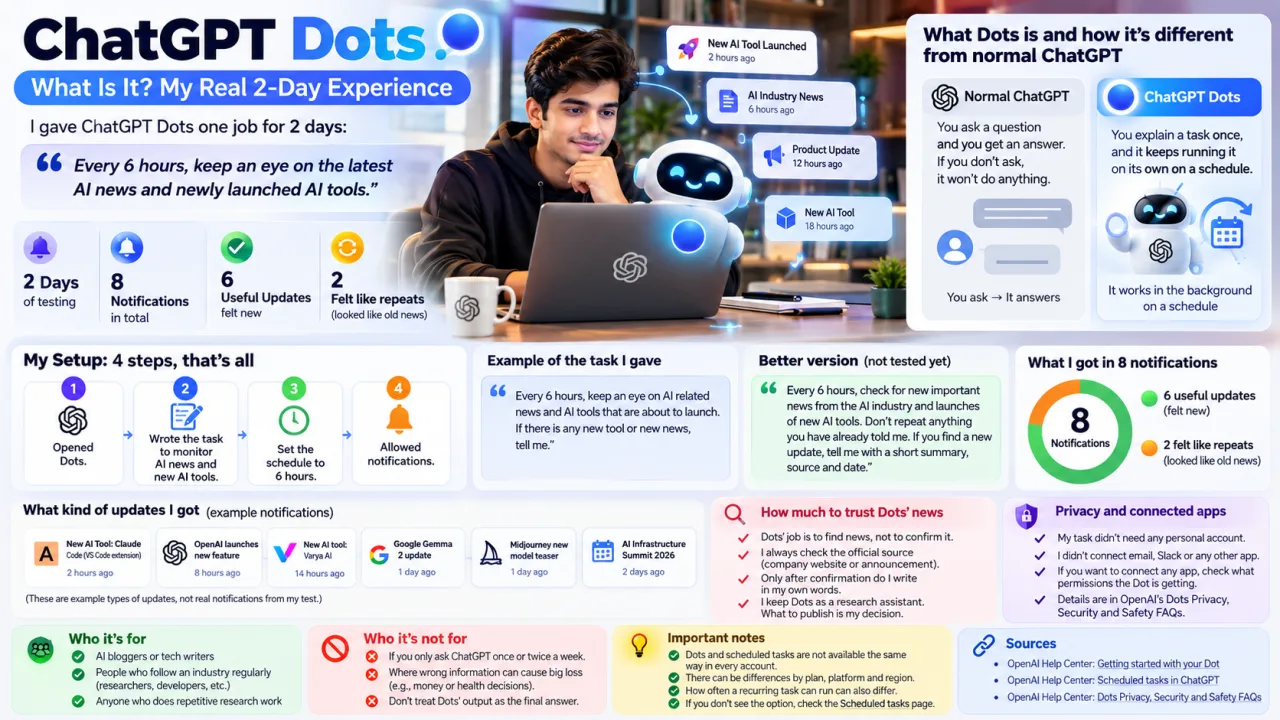
My setup was very simple. I didn't use any extra software or automation tool.
- Opened Dots.
- Wrote the task to monitor AI news and new AI tools.
- Set the schedule to 6 hours.
- Allowed notifications.
The notification step looks small, but this is what gets the alert to you. If the permission is off, the task will keep running, but you won't know.
One thing for beginners: just writing "check AI news" is not enough. The clearer you write, the more useful the result you get. I thought of this version later, and I haven't tested it yet:
"Every 6 hours, check for new important news from the AI industry and launches of new AI tools. Don't repeat anything you have already told me. If you find a new update, tell me with a short summary, source and date."
What I got in the 8 notifications, and where the problem came
Out of 8, 6 updates were useful and felt new. The other 2 felt like earlier news to me.
I don't know whether Dots sent them because they had some new information, or by mistake. My only answer from my side is that they looked like repeats to me. That's why I check every notification against the original source before making it into an article.
The mistake was mine too. In the first prompt, I didn't write that old information should not be repeated. Dot did what I said, and I never gave any rule to stop duplicates.
One more thing: this is only a 2-day test. The number 8 is the result of my task and my schedule. Someone else's number may come out different.
How much to trust Dots' news
In my view, Dots' job is to find news, not to confirm news. This difference is big for someone who writes news.
When an update comes, I first open the company's official announcement or the tool's own site. Only after it is confirmed there do I write, and in my own words. Once wrong or old news gets published, the credibility of a news site drops, and it is hard to build it back.
For this very reason, I keep Dots as a research assistant. What to publish is my decision.
Privacy and connected apps
My task didn't need any personal account, so I didn't connect email, Slack or any other app. The rule is simple: if a task doesn't need access, don't give it.
If you want to connect any app, first look at what permission the Dot is getting to read or change. The details are in OpenAI's Dots Privacy, Security and Safety FAQs.
Dots and scheduled tasks are not available the same way in every account. There can be differences by plan, platform and region, and how often a recurring task can run can also differ. So it's not certain that my 6-hour schedule will be available the same way in your account. If you don't see the option, check the Scheduled tasks page.
Who it's for and who it's not for
For an AI blogger or tech writer, this is directly useful. Tracking new tools and announcements is a daily repetitive job, and that's exactly what suits Dots. People who follow an industry regularly, like researchers or developers, can also try it.
If you use ChatGPT only to ask a question once or twice a week, you probably don't need Dots. And where wrong information can cause big loss, like decisions about money or health, don't treat Dots' output as the final answer.
Sources
- OpenAI Help Center: Getting started with your Dot
- OpenAI Help Center: Scheduled tasks in ChatGPT
- OpenAI Help Center: Dots Privacy, Security and Safety FAQs
Disclaimer
ChatGPT Dots' features, plans, limits and availability can change. For product details, treat the official OpenAI pages as the final reference.
MiniMax H3 Explained: The Open-Source AI Video Generator Everyone's Talking About
What Happened at AI Infra Summit 2026? Complete Recap (Santa Clara, Sept 15–17)
What Can GPT-6 Astra Actually Do? A Complete Breakdown of Its Tools and Capabilities