
Imagine giving Grok Build one small coding task, and behind the scenes your entire Git repository goes to xAI's cloud storage. This is the claim of an independent researcher named cereblab, who intercepted the network traffic of Grok Build version 0.2.93 and examined it. In their test the model needed only 192 KB, while 5.10 GiB of data went out on the storage channel. Below is the full picture: what happened, what is at risk, and what you should do now.
How the researcher caught it
The test setup was straightforward. The researcher intercepted Grok Build 0.2.93's traffic on macOS using mitmproxy, meaning they kept a copy of every request that went between the tool and xAI's servers. According to the report, Grok Build does not reject mitmproxy's certificate, which is why the traffic could be read.
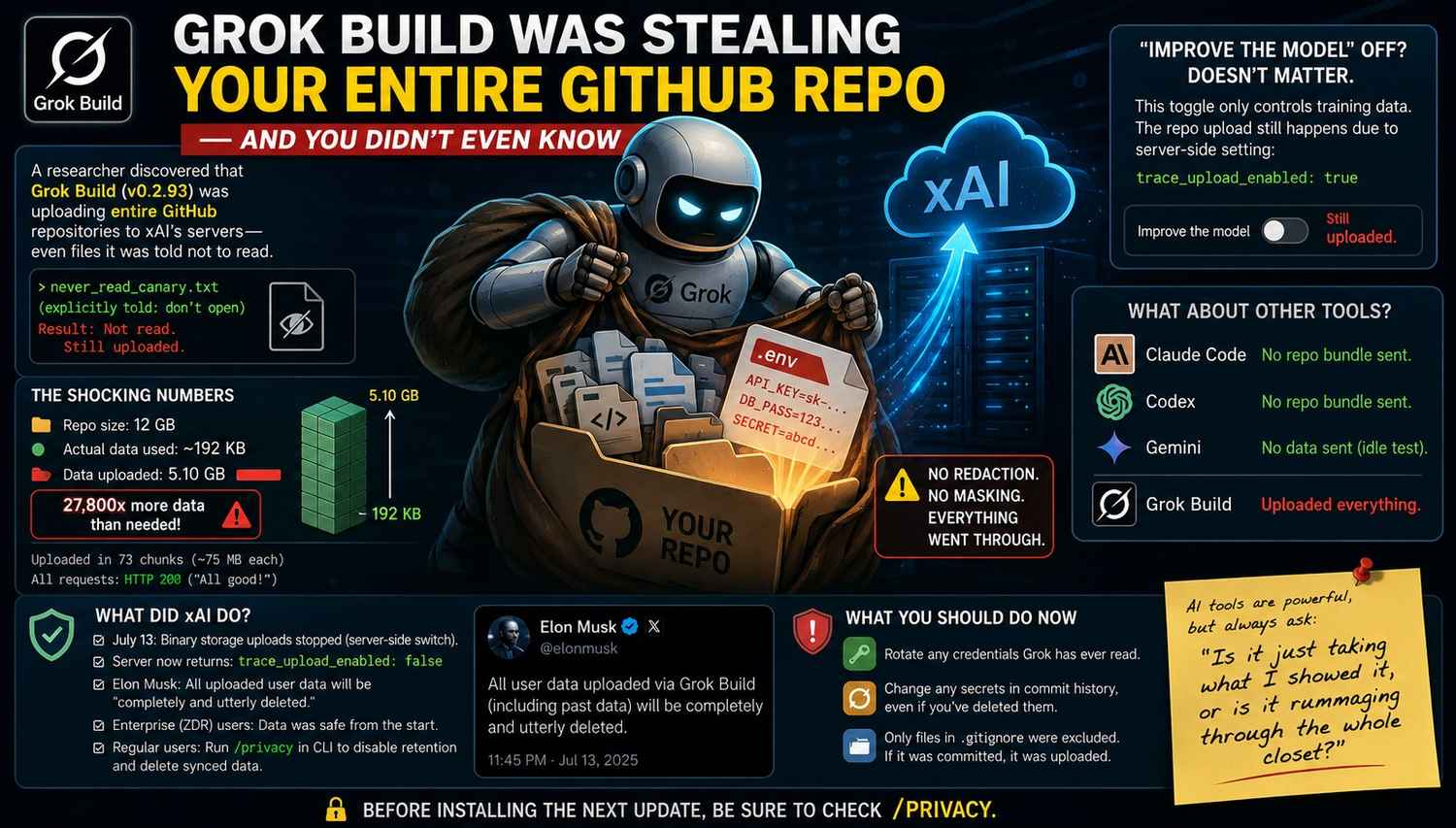
Two separate routes showed up in this capture. The first is the model's route, where only the files the agent actually read are sent. The second is the /v1/storage route. This is a separate pipeline that packages the whole workspace into a git bundle and sends it to a bucket named grok-code-session-traces, whether or not the agent touched any file.
The most striking test was this one. The researcher gave the prompt "reply OK, do not read any files", and the entire repo was still uploaded as a git bundle. They then ran git clone on the intercepted bundle. A file the agent had been told not to open, never_read_canary.txt, came back out of it with its unique marker intact, along with the full git history. A "canary" is a bait file placed only to check whether it ever leaves the machine.
The numbers that show the gap
On a 12 GB repo, model-turn traffic on /v1/responses was about 192 KB, while 5.10 GiB went out on /v1/storage. That is a gap of about 27,800 times. The upload happened in 73 chunks of roughly 75 MB each, and every request returned HTTP 200. HTTP 200 means the server accepted the request properly, so no upload failed.
One more detail is worth noticing. In the researcher's size sweep, the upload volume grew with the total size of the repo. So this was not a small sample or something like telemetry. The bigger the repo, the more data went out.
All of this comes from one researcher's test, and these numbers are from their report. Various news sites have repeated the same figures. So it is right to read them as "what the researcher found", not as figures confirmed by xAI.
Why the upload happened even with "Improve the model" turned off
Grok Build has a setting called "Improve the model", and most people assume that turning it off means "my data will not be used". The researcher turned it off and tested again. The full repo was still uploaded, and the server's /v1/settings response still showed trace_upload_enabled: true.
The thing to understand is that there were two different questions. "Improve the model" only decides whether a future version of Grok will be trained on your data. For whether data is sent at all, an ordinary user was shown no separate toggle. This gap is why people were shocked, because the setting's name said one thing while the behavior was something else.
The risk from .env files and old Git history
Two things can do the most damage: the .env file and Git's history.
A .env file usually holds API keys and database passwords. The researcher also confirmed that when Grok Build reads a file, its content reaches xAI without being redacted. The secrets in the report were fake, but in a real project that same file would be full of real keys.
The second risk is more hidden. According to The Register, Grok Build uploaded the full Git history, including secrets that had been deleted months earlier, and the researcher reproduced this on a separate repo as well. Deleting a file in Git does not remove it from older commits. If a password was ever committed and later removed, it can still be read in the history.
There is one important limit too. Files that were in .gitignore did not go into this bundle, because the bundle only covers tracked files and history. So the greatest danger is to whatever was ever committed.
xAI's and Musk's response, and the current status
After the report became public, xAI changed the behavior. The change came through a server-side configuration, not a software update. According to the company's official statement, teams with Zero Data Retention (ZDR) never have their code or trace data stored. Those who have not enabled ZDR can run a quick command to delete the data collected about them so far. That command in the CLI is /privacy.
On 13 July 2026, Elon Musk wrote on X that all user data uploaded to SpaceXAI so far would be "completely and utterly" deleted. But there is no independent confirmation of this. The Register stated clearly that it cannot verify whether the data was actually deleted. Likewise, xAI has still not explained why Grok Build uploaded the whole Git repo by default.
One more update: on 15 July 2026, SpaceXAI made Grok Build's source code public under the Apache 2.0 license. With the source open, anyone can check what the tool sends, which is good for transparency.
But one thing should not be taken lightly. A separate analysis found the upload code still inside the binary of a newer build, held off only by a server flag. In other words, the switch is off, but the bulb is still in place. This is from the analysis of build 0.2.99, and I am not treating it as a firm claim. Even so, it means that relying only on the company is not enough, and you should switch it off from your side too. According to one analysis, putting [harness] disable_codebase_upload = true in ~/.grok/config.toml gives a hard veto on whole-repo upload. Confirm this setting on your own version, because the name may change in a newer release.
If you have used Grok Build, what to do
First, stop assuming that the promise to delete is enough. Changing your keys is the real cleanup, because once data has gone out it cannot be taken back.
Follow these steps in this order:
1.Make a list of all the repos in which Grok Build was run, and check whether a .env or any config file was tracked in them.
2.Rotate all credentials of those repos: API keys, database passwords, cloud tokens, SSH keys. Disable the old ones only after creating the new ones, so your service does not stop in between.
3.Check the Git history. Running git log --all --oneline -- .env shows the commits in which .env was ever changed. To look for secrets across the whole history, you can run a secret scanner such as gitleaks.
4.If you find secrets in the history, rotate them first, and only then clean the history with git filter-repo or BFG Repo-Cleaner. Do this step later, because cleaning the history without rotating leaves the old secret still exposed.
5.Run /privacy in the CLI and turn off retention, so the old synced data gets deleted. Check the version and the setting name once on the official page.
One analysis also said that it is possible to check whether an upload happened. One writer searched ~/.grok/logs/unified.jsonl for repo_state.upload and saw that several of their repos had already been queued. This is one author's method, so treat it only as a clue, not firm proof.
What about other AI coding tools
Elsewhere in the blog it was also said that the researcher tested Claude Code and Codex too, and saw no repo bundle upload in them. About Gemini it was said that nothing went out in the idle test, but the real-task test could not be completed because the quota ran out.
The lesson to take from this: do not treat Gemini as "safe", because its test was incomplete. And even for the tool that was called "clean", it was one researcher's one test at one point in time. Behavior can change in a new version. In my view, before running any AI CLI in a repo that holds a client's code or secrets, it is sensible to check its network traffic or its open-source code once.
Remember also that every coding assistant has to send some code, otherwise it cannot work. The question is how much is being sent, and that can differ a lot between products.
Who this is for and who it is not for
This post is for freelancers and small developers who ran Grok Build in a client's repo, because they do not have an enterprise cover like ZDR and rotating the secrets is their own responsibility. It is also for startup teams who are checking an AI tool's data handling before choosing it. And it is for people who once committed a password in an old repo and forgot about it, because this case gives them a solid reason to clean the history.
It is not essential for people who never installed Grok Build, because they have no direct risk from this (though cleaning history is still a good habit). It is also not for people who work only on public open-source repos that contain no secrets, because the code is already public there.
Sources
• The researcher's original wire-level report: https://gist.github.com/cereblab/dc9a40bc26120f4540e4e09b75ffb547
• The Register (secrets deleted from history, ZDR, the promise to delete): https://www.theregister.com/a/5271123
• Neowin (Musk's X post): https://www.neowin.net/amp/elon-musk-says-spacexai-will-delete-all-grok-build-user-data-following-privacy-concerns/
• Hyrax (mitmproxy setup and disable_codebase_upload): https://hyrax.dev/blog/grok-build-cli-git-repo-upload-xai
• Let's Data Science (the toggle gap, code in the newer build): https://letsdatascience.com/blog/grok-build-cli-codebase-upload-privacy-toggle-broken
• Pasquale Pillitteri (analysis and open-source date): https://pasqualepillitteri.it/en/news/8049/grok-build-uploaded-git-repos-xai-cloud
Disclaimer
This information is based on public reports and is not security or legal advice. Settings and versions keep changing, so before taking any step, check xAI's official page once.
ChatGPT Dots: What Is It? My Real 2-Day Experience
MiniMax H3 Explained: The Open-Source AI Video Generator Everyone's Talking About
What Happened at AI Infra Summit 2026? Complete Recap (Santa Clara, Sept 15–17)